


ATOA Users Guide
Last updated: August 2016 for ATOA version 4.7.
Contents
- 1. Overview
- 2. Recent Changes to the ATOA
- 3. ATOA Searches
- 4. ATOA Data Downloads
- 5. Virtual Observatory Services
- 6. Example VO Queries
- 7. Download data files after VO Search
1. Overview
Welcome to the Australia Telescope Online Archive (ATOA) Users Guide.
The ATOA provides access to:
- Australia Telescope Compact Array unprocessed data from June 1990 onwards;
- Mopra (mostly MOPS) unprocessed data taken between May 1998 and March 2016;
- Parkes unprocessed spectral line and continuum data from April 1991 onwards;
- VLBI correlated long baseline data from Nov 1993 onwards;
- Data products provided by science teams for several large surveys carried out with the Mopra Telescope.
For information on data access policies please see the ATNF Data Policies
Recommended Browser
The recommended browser for the ATOA is Firefox.Other browsers will usually also work well but may not be supported.
Enquries
Enquiries relating to CSIRO data archives are welcome. Please contact the data support desk by email to ATNF Data Support.2. Recent Changes to the ATOA
Recent upgrades to the ATOA include:
- Improved handling of high-volume data downloads. For more information see section 4.
- Access to the ATOA provided through Virtual Observatory services. For further information see section 5.
3. ATOA Searches
ATOA Search Form
On the ATOA Home Page, click on the link to 'ATOA Search' to bring up the search form. To use the form enter some search criteria and then click the 'Search' button.
The search form uses AND logic so that results returned match ALL of the criteria entered. Here are a few examples:
- To search for a particular project enter the project code.
- To carry out a cone search centred on a position, enter the position and a search window (radius).
- To restrict a search of Compact Array data to one or more array configurations, select one or more of the options in the Array field near the bottom of the form.
- To carry out a search for multiple positions, provide an OPAL Observations Table or an OPAL Source Table as an input file.
Report Types
The ATOA Search form has two report type options:
- Scans Summary
This generates a summary report. The search output is shown as an html table that can be sorted by date or source name. In this table the scan time corresponds to the total time on source during a 24-hour period (from 00:00:00 to 23:59:59 UT). - Matching Files
This report provides a list of all the data files that match the search criteria. The output report gives a list of data filenames together with some summary information. To see more detailed information on the contents of a file, click on the small triangle next to the filename.
Mopra Data Products
The ATOA also holds data products from several Large Surveys carried out with the Mopra radio telescope. These have been made openly available by the survey science teams. For each of these surveys the ATOA includes some information about the survey together with a simple search form to access the data products. Please refer to the ATOA pages for further information.
4. ATOA Data Downloads
To select files for downloading, a user login is required. The ATOA shares a self-managed user registration system with OPAL, the ATNF proposal application system. To obtain an OPAL user account, or to reset a password, click on the ATOA link to 'login or reset password' and follow the instructions from there.
Please note that data transfers can be slow and download speeds could vary greatly between different locations. The transfer time will depend on several factors including network speeds and number of network users. Where possible, try to keep your data volumes low!Low-volume data downloads
- To download a single data file using the html transfer protocol, click on the check box and then select download.
- To download a small number of data files as a single tar file:
a. Select the files to download using the checkboxes. You can select a range of files by selecting a file and holding the shift key while you select the last file in the range.
b. Click the download button
c. Extract the archive contents, for example using > tar -xf filename
Note that if a single tar file download fails all downloaded data are lost. We recommend that large files, with file sizes above one GB, be downloaded as a set of individual files as described below. A size limit of 100 GB is set for downloading files in a tar file.
High-volume data downloads
To download large-sized files and/or many files, we recommend that you select 'Get URLs in HTML' or 'Get URLs as text file'. The first option will generate a list of web links to the files, the second one provide the same set of links in a plain text file that can be saved to your computer. These links can be used as described below to access the data files and will remain 'open' for a period of three weeks. A maximum of 500 GB can be requested using these methods.
There are many options for downloading files from a list of URLs. Here, we describe three methods that (unlike using a tar file) should all allow a download to be continued after being interrupted.
- To download files, one at a time:
Use the 'Get URLs in HTML' option. Then right-click on a link, select "Save Link As..." and select the destination for the file on your local drive.
- To run a script that can handle downloading multiple files:
Save the links in a text file and then run a script to access the files. Here are two examples of single line Unix scripts. If the download process is interrupted, try restarting the script. This should continue from where it left off.
- downloading multiple files one by one: xargs -i wget -c '{}' < links.txt
- downloading several (5 in this case) files in parallel: cat links.txt | parallel -j5 --gnu "wget -c {}"
- To download multiple files with a download manager:
Many download managers are freely available on the internet. One example we have used, wxDownload Fast is an open source, free multiplatform download manager that supports multithreaded (i.e. parallel) downloading of large files.
Note that these example use the Unix utilities, 'wget' and 'parallel'. You may need to request that these be installed for use with Unix or Linux.
5. Virtual Observatory Services
The ATOA records (other than for Mopra data products) can now also be accessed as a Virtual Observatory (VO) Catalogue.
The ATOA VO Catalogue contains approximately 10 million rows and includes records from 1989 to the present. The catalogue provides metadata corresponding to the data files recorded with ATNF facilities. For a given data file, each row in the VO catalogue corresponds to a sky position together with metadata that describes a set of observational parameters and observing times. Some other metadata such as file sizes and access URLs are also given.
To find information in this catalogue, we recommend using the freely available program TOPCAT (Tool for OPerations on Catalogues And Tables). TOPCAT is like a 'browser' that provides access to VO supported data products together with many tools for working with these. It allows considerable flexibility in setting up search queries and has tools for combining and comparing information from different facilities.
To install TOPCAT go to the TOPCAT downloads webpage and download the full jar file. You may also need to install a Java Runtime Environment (JRE) if this is not already installed on your computer. If so see the advice and links on the TOPCAT page.
For full TOPCAT tutorial and reference documentation please see the TOPCAT website. Some tutorial-style information on using TOPCAT given in the CASDA Users Guide may also be useful.
Accessing the ATOA Catalogue using TOPCAT
To access the ATOA catalogue using TOPCAT the following steps can be used:- Open TOPCAT. You will see a window open up. This window, called the 'Main Window' is like a 'command centre' so try not to close it!
- Click on the link in the top menu bar to 'VO'.
- Click on the drop down option for 'Table Access Protocol (TAP) Query'.
- In the 'Selected TAP Service' box located near the bottom of the page enter the TAP URL Link as https://atoavo.atnf.csiro.au/tap and then click on 'Use Service'.
- You will now see a list of catalogues. Click on the catalogue called 'ivoa.obscore'. This is the catalogue with all of the ATOA metadata. Note that this is a large catalogue with about 8 million rows.
- Now enter a simple query in the ADQL text box near the bottom of the page to create a local subset of the ATOA catalogue. For example, to select the first 1000 rows in the catalogue enter:
select top 1000 * from ivoa.obscore
A local version of the table will now appear in the table list seen in the Main Window. To save this table use: file > save Table(s)/Session and follow the prompts to choose an output table format and location etc. The TOPCAT write options include a range of table formats including VO-table, html, FITS, ascii and csv.
Inspect Catalogue Data
The following notes show how to have an intial look at a VO catalogue using TOPCAT.- Run a simple query to add a table to the Table List in the OPCAT Main Window as described above.
- Select the table from the Table List .
- Click on each of the three TOPCAT table icons that look like this:
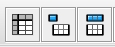
- - The first of these opens a window with the table data.
- - The second opens a window with metadata that describe the table.
- - The third opens a window with metadata that describe the table columns. These include units and descriptions.
Have a look at each of these to get a feel for the data in the table and how this is described.
TOPCAT and very large queries
Please note that whilst it is very quick to query the ATOA VO Catalogue, it can take some time to write the results to a local table and this will scale with the number of rows to be written.
In general, we advise using filters to select records and columns of interest. Some example are shown below.
If you wish to extract a very large number of rows (generally above about two million) from the ATOA VO Catalogue then it may be necessary to increase the memory allocation to TOPCAT. For assistance with this, or have any other VO questions, please send an email to ask for assistance.
6. Example VO queries
Here are a few simple examples to illustrate using ADQL queries with TOPCAT. For further information see the document IVOA Astronomical Data Query Language.
Select records for the ATCA project code C1450
select * from ivoa.obscore where obs_collection = 'C1450'
Notes: Here the asterisk indicates that all columns are selected.
Select the top 1000 rows in the catalogue with data_flag = 1 and write out a local table a selected set of columns
In this example, a data_flag =1 indicates likely to be a nomral observation. Data_flag = 999 indicates that the observing scan was likely to have been for engineering or other non-scientific purposes.
Select top 1000
obs_id, obs_collection, ra_hms, dec_dms, frequency, bandwidth, access_url, data_flag, access_estsize
from ivoa.obscore
where data_flag =1
select the top 100,000 rows including only Compact Array projects
This example uses a filter to select only Compact Array records
Select top 100000
obs_id, obs_collection, ra_hms, dec_dms, frequency, bandwidth, access_url, data_flag, access_estsize
from ivoa.obscore
where obs_collection like 'C%' and data_flag =1
Write a table with a single column corresponding to the set of file names for a given project
This example shows how to generate a table with a single column that contains the distinct set of filenames for a given project C1450.select distinct obs_id from ivoa.obscore where obs_collection='C1450'
7. Download data files after a VO search
The following steps provide one method of obtaining a set of data files that correspond to searches carried out using TOPCAT. In this method, TOPCAT is used to determine a set of filenames and the ATOA is used to generate a list of download links to the files.
- As described above, use TOPCAT to generate a list of filenames corresponding to the data files you wish to download.
- in TOPCAT, save this list to a local file using a file format = csv_noheader.
- Go to the ATOA and login.
- In the ATOA click on the link to the ATOA File List Download and then load the file with the list of filenames you have created in TOPCAT (or cut and paste the list).
- Now follow the ATOA steps described in section 4 above for high-volume downloads to access the data files.