
The Focus Cabin Computer User Guide
M. Kesteven
Overview
The FCC is the computer which looks after the machinery in the new focus cabin. Its sole function at this stage (1995) is to supervise the motion of the receiver translator. In the near future it will also provide control and monitor facilities over receivers and associated equipment installed in the focus cabin. The software has been designed to provide fully automatic operation: an observer's program may request that a receiver be placed on axis, for example. In addition, there is an automatic link back to the control system to ensure that the receiver is kept at the optimum focus position at all antenna positions. A fully interactive (manual) mode of operation has also been provided, allowing an operator to monitor and control the operation of the carriage.The Hardware in the Focus Cabin
- FCC
- The FCC is a PC installed in the smaller RFI-tight box next to the carriage translator. It runs the pSOS operating system and uses a DeltaTau PMAC to control the translator motors. There is a keyboard and monitor for local (operator) use; the FCC has an ethernet connection to the outside world. Figure 1 provides an overview of the connections.
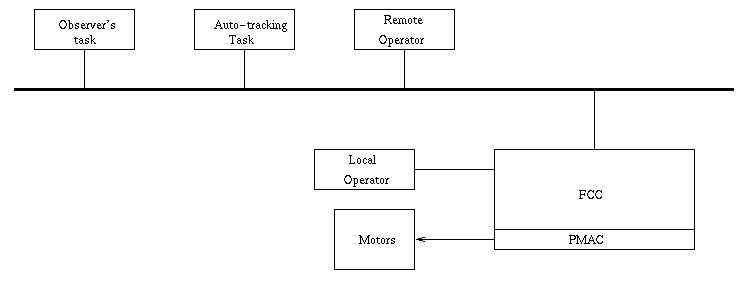
Figure 1. Overview of the FCC connectivity
- PMAC
- This is a dedicated motor controller installed on the PC bus. The PC specifies a translator position in natural units (mm; degrees); the PMAC checks that the drive is safe, then coordinates the different motors to reposition the carriage. The PMAC software was developed by Industronics. An outline of the PMAC operation is given in Appendix A . .
- Translator
- The Carriage Translator has two separate platforms, each capable of holding several receivers; Platform 1 is on the downhill side (nearest the lift leg). The carriage moves along the Z-axis; the origin is at the uphill end; positive motion is towards the lift leg. Each platform can move Y direction; the origin is in the parked position, furthest from the dish surface; positive motion is towards the dish. Each platform can rotate from -180 to +180 degrees; the parked position is at 0 degrees; positive motion is counter-clockwise, seen from above. See Figure 2.
Platform 1 can only be lowered when the carriage position (Z) is between (roughly) 0. and 877. mm; the limits for Platform 2 are 1613 to 2180 mm. (The precise values will be set after the final calibration of the translator in january, 1996).
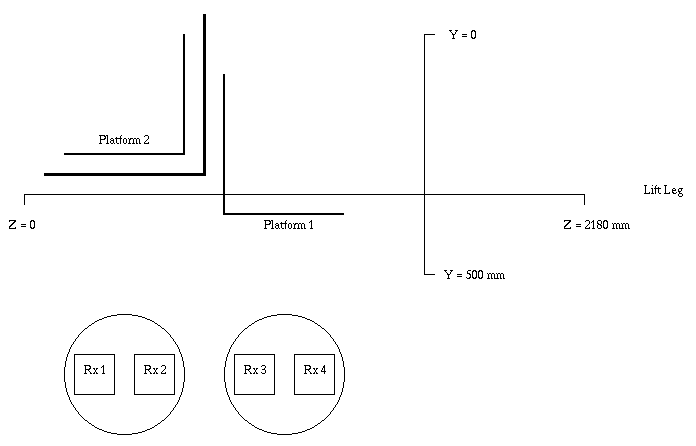
Figure 2. The Translator Geometry.
Safety and Control
There is a three-position switch on the front panel of the FCC that defines the control mode :
Software - One-minute Cookbook
- Startup
- Insert the "Stand-alone" floppy in the drive, and turn the power on. The FCC will take about one minute to load the pSOS operating system, and then start the FCC code. The operation is complete when you see the message : ... now Hibernating".
- Get the Carriage status
- Type show status .. This should produce a display such as shown in appendix D. This display is updated every 2 seconds, and shows the current position of the carriage as well as its status.
- Initialise the PMAC
- Type INIT ... this ensures that the PMAC's coordinates are correctly related to the translator. This may take a few minutes if a long drive is involved -- check the carriage's status.
- Drive the carriage
- Type obs> select rxname to position receiver rxname on axis. For example : obs> select galileo . (Type show rxdb if you are uncertain about the receiver names).
- or type obs> abs P Z Y R to move the carriage to Z, then lower platform P to Y and rotate it to angle R. For example, obs> abs 1 500. 320. 0.
- Type obs> rel DZ DY DR to increment the Z,Y and R values. For example, obs> rel 5. -10. 0.
- or type obs> abs P Z Y R to move the carriage to Z, then lower platform P to Y and rotate it to angle R. For example, obs> abs 1 500. 320. 0.
Software - Overview
The control side of the FCC is sketched in figure 3. In effect, the translator is controlled by the local operator or by the remote operator or under remote computer control (the observer's task and the auto-tracking run by the control system). For safety reasons the operator can always take control, and that control can only be released by the operator.
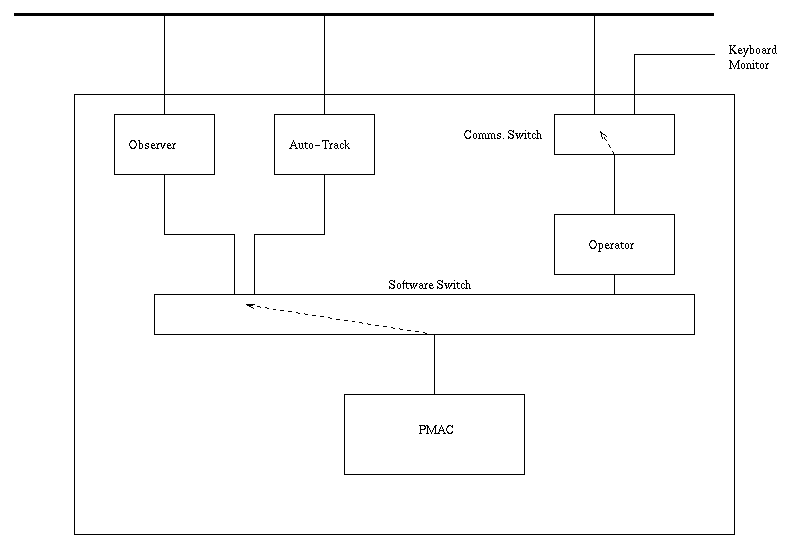
Figure 3. Control connections within the FCC.
The monitor side is more relaxed, with all communication lines having access to the monitor data.
Switching between modes
The auto modes acquire control by default at startup. An operator may at any time take over, and retain control until explicitly released.
The Comms. switch between the two operators (local and remote) is basically a simple toggle switch: entering a command will gain attention. Note that this simply defines the communication line for the operator - it will allow access to monitor data, but does not affect the control state.
The Operator's options
- 1. Detailed FCC monitor displays
- show message
- show message
- The FCC provides a running commentary of its operation, with ERROR, WARNING and Informative messages. These will appear on the operator's screen. The ERR and WARN messages are also stored - this command allows the operator to review the last 16 serious messages.
- show Perr
- The PMAC will report error conditions (eg "In Limits"); the PMAC will also report the lifting of an error condition. This command lists the known outstanding error conditions.
- show Pos
- This is a brief (2-line) summary of the translator position. (It is an alternative to show status provided for debug purposes, as it allows much more space for diagnostic messages).
- show Pstat
- The PMAC also reports status changes (eg, brakes ON/OFF). This command lists the current pmac status.
- show rxdb
- Ths command lists the installed instruments' parameters. (This is the information needed by the FCC to place a given receiver on axis - see Appendix C ).
- show status
- This commands provides a detailed look at the translator status. This display is refreshed every few seconds. A typical display is shown in Appendix D.
- 2. Control options.
- stop
- stop
- This will stop all carriage motion - IRRESPECTIVE of the control state.
- take
- release
- release
- take/return control to the remote host
- Init
- The PMAC will not drive the translator until it has been been correctly initialised - that is, if the PMAC is ever switched off (or there has been a power failure) then a special sequence is required to ensure that the PMAC's coordinates are correctly aligned with reality. INIT is the command to force that initialisation. This is a benign operation, but should not be done wantonly. (You need to have control over the translator for this command).
- bypass
- This is a shortened version of INIT - it bypasses the PMAC phase. Operators should be aware that the IMAS operation is a little fragile at this stage (january 1996), and an INIT operation should be avoided if the PMAC has not lost its calibration. For example, a reboot of the PC does not affect the PMAC, so the PMAC INIT is unecessary.
- p:xxxx ..... Direct communication with the PMAC
- The sequence p:STRING will send the ascii string STRING directly to the pmac. For example, p:p3=1 would send p3=1 to the pmac. In general this command will elicit a response from the PMAC; this will appear on the operator's screen, embedded in additional communications data. This is a debugging tool, for real experts only. (This command will fail, with an error message, if attempts to drive an unitialised PMAC).
- IMAS
- This command recalibrates the IMAS (absolute encoder). Also deprecated for non-experts. The carriage must be parked at z=0, and the motors disabled. The result (the motor offset) should then be entered into the file crg.dat on the floppy.
- debug on
- debug off
- debug off
- This allows/disallows the operator to monitor the FCC traffic.
- help
- The machinery exists, but it is not very developed at present.
- 3. The operator can also emulate a remote observer task, or the auto-tracker.
- obs> select rxname
- obs> select rxname
- This command selects a receiver by name and places it on axis. (eg, obs> select galileo for the galileo receiver).
- obs> abs P Z Y R
- This is an absolute move request - move the carriage to Z, then lower platform P to position Y, and rotate to angle R. The units are mm, mm and degrees. You'll get an error message if the position is outside the limits.
- obs> rel DZ DY DR
- This requests an offset of DZ, DY and DR to the current position. This is added to any previous REL requests. These offsets are cleared whenever an ABS or a SELECT command is issued. You'll get an error message if the offsets would push the carriage outside the limits.
- obs> park
- This raises both platforms to Y=0, rotates them to R=0 and drives the carriage to Z=1200.
- obs> enable par
- obs> disable par
- obs> disable par
- enable/disable the parallactic angle tracking.
- obs> enable ALL/P1/P2/NONE
- Variants of the quiet mode. P1 keeps platform P1 running, and permanently disables P2; P2 enables P2; NONE turns off all motors. ALL (the default) activates the motors as required, and disables the parked motors.
- obs> status
- This requests a one-line status summary - all motors.
- obs> trkzero
- trk> DZ DY R
- trk> DZ DY R
- This is the auto-tracking mode; DZ and DY are offsets; R is the parallactic angle.
Remote Operator
Establish connection as remote operator : see the local staff for the code and password. You will get a polite rebuff if a remote operator session has already been established. You will have a tedious wait if the FCC is not communicating. Once the connection has been made you should type a character (plus return) to gain the FCC's attention.
FCC data files
There are two data files on the FCC diskette which contain reference data used by the FCC. (Both files are self-documenting).
- crg.dat
- (a). Position calibrations. These are the settings required to place a platform centre on axis; the values are related to the Translator Reference Mark placed on the frame by EDE. (See B.Thomas's note .. AT/xxxxx/).
Platform 1 ... Z = 410. mm, Y = 360. mm
Platform 2 ... Z = 2100. mm, Y = 360. mm.
- The critical IMAS calibration factor is also in this file.
- (b). Platform limits.
- (c). Translator characteristics (velocities and accelerations).
- The critical IMAS calibration factor is also in this file.
- rxdb.dat
- There should be an entry for every installed receiver. There three records which contain the receiver name; the frequency limits; and the platform and (Z,Y,R) offsets needed to place the receiver on axis.
Debug/Development mode
The pSOS system provides substantial debugging facilities. These are described in the pROBE+ manual. See appendix B for a quick canter through the details.
The master copy of the code resides in the PC ("PKFCC01") in the tower.
Auto-Tracking
A task, user0:[mkesteve.fcc.work]trkfcc.exe has been provided for this purpose. It runs on BUNYIP and accesses the global common DESKCOM. The critical issue for this task is to ensure that its algorithm for computing the offsets (DZ and DY) is consistent with the antenna pointing model.
TRKFCC reads a parameter file when it is started (TRKINI.FILE); the coefficients of the carriage algorithm reside in this file. TRKFCC checks that there is a reasonable match between pointing model and the coefficients, and will issue a warning message if the discrepancy is large.
TRKFCC is intended, in the early stages, to be run interactively: it will show the current FCC status, as well as the carriage increments sent to the FCC. A history log is kept, and the recent messages are displayed.
Appendix A .. PMAC operation
The PMAC is designed as a servo controller, with a fixed cycle set (in our case) to x msec. Every cycle it checks that every motor is safe - if the carriage is driving to a new position the pmac checks that the motor is within limits (position, velocity and acceleration). The PMAC is a fast machine (30 MHz), with plenty of CPU cycles to spare. These are distributed in a conventional time-slicing way over a number of tasks (called PLCs) which look after the communications and the housekeeping.
The PC communicates with the PLCs via the pmac's operating system: we send an ascii stream to the pmac requesting that certain parameters be set (eg, P3=1 .... set the variable P3 to 1); the operating system does the translation; the PLCs poll these variables and respond accordingly. The PLCs also keep an eye on the status of the motors, limit switches and the amplifiers.
The pool of variables is open for inspection by the operator - for example type p:M1000 to find the value of M1000; type p:M1000=1 to set M1000 to 1. Consult the PMAC user guide for the pmac specifics; consult the Industronics documentation for the specifics on the variables.
(back to main text) Assuming that all is well, the next step is to type reset when the load is complete. Type go to start the FCC. Thereafter it will as in the normal (standalone) mode, unless it runs into trouble when the development PC will provide some diagnostics.
Consult the pROBE+ guide for full details.
Appendix B .. Development/Debug mode
The requested carriage coordinate is the sum of four quantities:
1. (CRG) : the Y and Z settings which would place the platform's centre on the nominal radio axis.
2. (Rx) : the increments (DZ,DY,DR) defined for a given receiver.
3. (Oper) : the increments (DZ,DY,DR) entered by the operator.
4. (Track) : the increments computed by the control system, and sent by the auto-tracker.
The operator's offsets are discarded whenever a new receiver is selected. The RX and Oper offsets are disacrded if the operator requests an Absolute position.
The nominal radio axis is the location fixed to the focus cabin - it is the function of the auto-tracker to make the connection between nominal and actual.
Appendix C .. The Carriage algorithms
Appendix D .. SHOW STATUS display
AEST : 95/12/28-09:26:09.9 Uptime : 0.11 hours ; (LocalC) Platform : 1 -- Receiver : GALILEO at 95/12/28-09:26:00.1 ... data timestamp Current Z [1]: 0.0 mm; Y : 0.0 mm; R : 0.0 (D) .. platform 1 [2]: mm; Y : 0.0 mm; R : 0.0 (D) .. platform 2 PMAC state : No INIT; Request Z [1]: 220.0 mm; Y : 0.0 mm; R : 0.0 (D) [2]: mm; Y : 0.0 mm; R : 0.0 (D) CRG offset - dZ : 0.0 mm; dY : 0.0 mm; dR : 0.0 Rx offsets - dZ : 220.0 mm; dY : -10.0 mm; dR : 3.0 Oper offs - dZ : 0.0 mm; dY : 0.0 mm; dR : 0.0 Track offs - dZ : 0.0 mm; dY : 0.0 mm; dR : 0.0 R-drive OFF .... parallactic angle tracking (disabled) Control : OBS (remote ACS) Rescheds - O: ; P: 95/12/28-09:26:10.1
Original: mkesteve@atnf.csiro.au (29-DEC-1995)